Redesigning how new users get started with Actify, to help them find a starting point that suited them.
What began as a broader vision for personalised guidance eventually became a more focused solution within the existing product.
Role
UX/UI Designer
Team
Product owner, service designer, content marketer, with external developers and a business analyst
Focus
Route choice, onboarding journey and personalised advice
Year
2025–2026
01
Finding a starting point
Freedom doesn't work equally well for everyone
Actify helps people work towards a healthier lifestyle through habits, challenges and small daily activities.
The app gives users the freedom to choose what they want to work on. Previous user research showed that this flexibility worked well for some, while others struggled to decide where to begin or which activities were relevant to them.
Actify wanted to reach more users, so getting started became an important area to improve. But more guidance came with a tension. How do you help users who need direction, without restricting those who'd rather explore on their own?
Looking for directionSome users wanted help deciding where to begin.
Preferring freedomOthers valued choosing and exploring independently.
Paraphrased findings from research conducted before my involvement.02
Exploring the possibilities
Different levels of guidance
The initial exploration considered three ways to begin using Actify, offering different levels of guidance and commitment.
One route centred on a real-age health assessment, helping users identify areas of their lifestyle they might want to improve. Other approaches offered less involved ways to get started.
The exploration also raised questions about how Actify could offer relevant guidance beyond someone's first visit. This made the potential scope considerably broader than onboarding alone.
As the direction developed, the focus narrowed to improving the starting experience within the existing product. Different levels of guidance were still the goal, just within a smaller solution.
Narrowed scopeHow new users get started, within the existing app
My recommendation
Not waiting for onboarding
Part of the broader direction didn't have to wait. The health assessment was useful for existing users too, so I recommended releasing it on its own in the app, ahead of the new onboarding. Existing users could take it from their profile and get personalised advice straight away.
The questionnaire and initial results page were designed by another product designer.
03
Working within the existing product
When the proposed journey met the existing product
With the focus on onboarding, the aim was a starting experience that adapts to how much guidance someone wants, rather than one fixed sequence for everyone.
Timing mattered as much as structure. Route introductions would set expectations, transitions would make progress visible, and explanations about features such as notifications would appear when they became relevant.
Together, these changes aimed to make the journey easier to understand without overwhelming users with information upfront.
Implementing this journey would have required substantial changes to Actify's existing onboarding and account flow. Not all of those changes were feasible, so we needed to identify which parts were most important to deliver.
Identifying what mattered most
Printing the proposed screens and laying them out side by side made it clear which changes depended on restructuring the journey, and which were needed to integrate the real-age assessment.
The priority became two starting routes, one through the assessment and one through direct habit selection, while keeping much of the existing onboarding sequence.
The result was smaller than the original proposal, but it brought the assessment into onboarding without a complete rebuild.
ProposedA restructured journeyRoutes with different levels of guidance, requiring substantial changes to the existing onboarding and account flow.
DeliveredTwo routes within the existing flowAssessment and habit selection, added to the existing onboarding sequence.
04
Two ways to begin
Giving users a choice
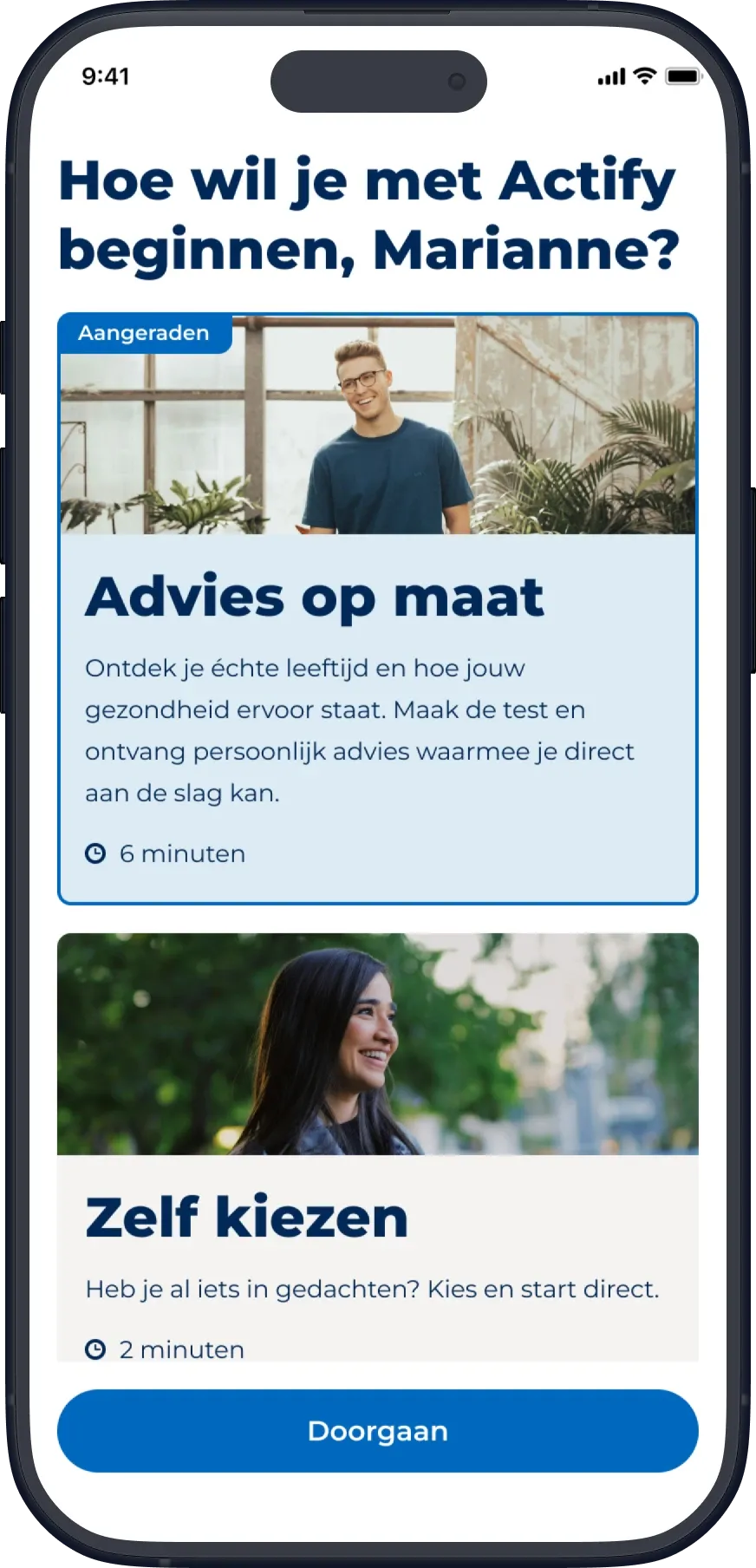
The released onboarding introduces two ways to get started.
Users who want more guidance can complete a real-age health assessment and receive personalised advice about areas they might want to focus on. Those who already know what they want to work on can choose a habit and starting level directly.
Both routes lead into the existing Actify experience.
The released route-choice screen.
Designing the choice
The route-choice screen presents both options together, with a description of what each offers and an estimated completion time.
Time estimates. About six minutes for the assessment, about two for starting directly, so the difference in commitment is tangible.
Both options visible. I explored carousel-based alternatives, then chose a layout that lets users compare both without having to discover an additional card.
A recommended route. The assessment was given more prominence, including a recommendation label. This reflected the product direction at the time, but it also created an imbalance between the two choices.
Iterations
Alternatives explored for the route-choice screen before the released layout.
Iteration A
Compact horizontal cards, with the photo beside the text instead of above it.
Iteration B
A carousel, where the second option had to be discovered.
Setting expectations before continuing
After selecting a route, users see a short introduction explaining what to expect, so they understand the path they've chosen before they begin. I designed their structure and initial content direction, with final copy developed by the content specialist.
Route 1
Introduction to the assessment.
Route 2
Introduction to starting with choosing habits.
Turning results into a starting point
The real-age assessment identifies which areas of someone's lifestyle could benefit from improvement. But showing users their results was only part of the experience. They also needed a way to decide what to work on next.
Instead of showing the full habit catalogue, I built the advice section around the themes from their results. Within each theme, habits are ranked according to their answers, so the recommendations reflect their individual situation.
Giving guidance without making the decision for them
I chose to preselect the highest-ranked habit within each relevant theme, up to a maximum of three. The intention was to give users a starting point, so they wouldn't face another set of choices right after completing the assessment.
These recommendations aren't fixed. Users can change their selections, and the interface makes the three-habit limit clear.
One question remains unanswered: does preselection help users get started, or does it make them less likely to consider alternatives? That's something I would want to validate through usability testing.
Handling overlapping recommendations
A habit can contribute to more than one lifestyle theme. This meant the same habit could appear in several groups of recommendations.
I designed an Al gekozen state to communicate when a habit had already been selected under another theme. This prevents duplicate selections while keeping the relationship between habits and themes visible.
The result is an advice experience that offers a suggested direction while still allowing users to decide which habits they want to start with.
01 · Result
The real age and lifestyle themes, with the sticky Ons advies bekijken button. The overview is an existing Actify
component.
02 · Advice
Habits grouped by theme and ordered by the answers, with preselected suggestions and the Keuze opslaan button.
Reflection
The flow I had designed and what an established product could realistically take on turned out to be two different things. I had to let go of the original flows, but I held on to the part that mattered most: users choosing how they want to begin.
There are two decisions I'd still like to test. Does giving the assessment route more prominence help users choose what suits them? And does preselecting habits guide them without steering their choices too much?
The photos in these screens have been replaced with royalty-free images, as the app itself uses licensed stock photography.